
Setting up a reliable wired network depends heavily on one key detail that is often overlooked: the correct RJ45 ethernet cable color order. Whether you are building a home network, configuring office systems, or repairing a LAN cable, understanding the correct wiring sequence ensures stable connectivity, faster data transfer, and fewer network errors.
This guide explains the RJ45 color coding system in a simple, practical way. You will learn the standard wiring schemes, how to crimp cables correctly, and how proper alignment improves your network performance.
Understanding RJ45 Ethernet Cable Basics
An RJ45 connector is the standard plug used for Ethernet networking cables. It contains eight pins that transmit and receive data signals between devices such as routers, switches, and computers. The arrangement of wires inside the connector directly affects network performance and reliability.
The RJ45 ethernet cable color order is based on standardized wiring schemes known as T568A and T568B. These standards ensure that devices can communicate correctly regardless of who made the cable or equipment. Without following these standards, you may experience slow speeds or no connection at all.
RJ45 Ethernet Cable Color Order Chart Explained
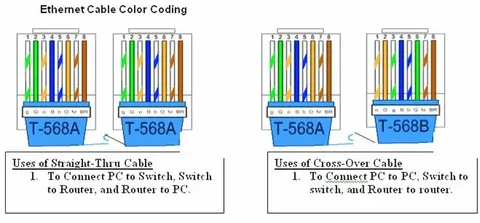
The most commonly used wiring standard in modern networks is T568B. Below is the typical color order for an RJ45 connector using this standard:
- White-Orange
- Orange
- White-Green
- Blue
- White-Blue
- Green
- White-Brown
- Brown
This RJ45 ethernet cable color order ensures that signals are properly transmitted and received across devices. T568A is another valid standard, but it is less commonly used in commercial networking environments.
T568A color order is slightly different:
- White-Green
- Green
- White-Orange
- Blue
- White-Blue
- Orange
- White-Brown
- Brown
Both standards work, but consistency is crucial. Mixing both on a single cable type can cause connectivity issues, especially in direct device-to-device connections.
Straight-Through vs Crossover Cable Wiring
A straight-through cable uses the same RJ45 ethernet cable color order on both ends, usually T568B to T568B or T568A to T568A. This type is the most common and is used to connect different devices like a computer to a switch or router.
Straight-through cables ensure proper signal alignment, making them ideal for everyday networking tasks. They are widely used in offices, homes, and data centers due to their simplicity and reliability.
A crossover cable, on the other hand, uses T568A on one end and T568B on the other. This design allows similar devices, such as two computers or two switches, to communicate directly without a router or switch in between.
While modern networking equipment often auto-detects and adjusts for cable type, understanding both wiring methods is still important for troubleshooting and older systems.
Step-by-Step Guide to Crimping RJ45 Cables
To correctly apply the RJ45 ethernet cable color order, you need a crimping tool, RJ45 connectors, and a properly stripped Ethernet cable. Start by removing about 1 inch of the outer jacket to expose the inner wires.
Next, carefully arrange the wires according to the T568B or T568A standard. Ensure they are straight, aligned, and trimmed evenly before inserting them into the RJ45 connector. Each wire must fully reach the connector tip to ensure a proper connection.
Once inserted, use the crimping tool to secure the connector firmly. This step locks the wires in place and establishes a stable electrical connection. Always test the cable using a network cable tester to confirm proper wiring before installation.
Common Mistakes in RJ45 Wiring and How to Avoid Them
One of the most common mistakes when working with RJ45 ethernet cable color order is mixing up wire positions. Even a single incorrect wire can cause network failure or reduced speed. Always double-check the sequence before crimping.
Another frequent issue is leaving wires too long or uneven. This can prevent the connector from properly seating the wires, leading to weak or unstable connections. Keeping wires straight and trimmed to equal length is essential for success.
Poor crimping is also a major problem. If the connector is not pressed firmly enough, the wires may not make full contact with the pins. Investing in a quality crimping tool and testing each cable helps avoid these issues and ensures long-term reliability.
Conclusion
Understanding the correct RJ45 ethernet cable color order is essential for building a fast, stable, and efficient network. Whether you are using T568A or T568B, consistency is the key to avoiding connectivity problems and ensuring smooth data transmission.
By following proper wiring standards, carefully crimping connectors, and avoiding common mistakes, you can create professional-quality Ethernet cables that support high-speed networking. This knowledge is especially valuable for IT beginners, technicians, and anyone working with wired networks.